The MYOB Capture and MYOB Invoice apps are retiring
MYOB Capture and Invoice apps will stop working on 29 September 2026
To keep capturing receipts and sending invoices from your mobile, download MYOB Assist and sign in with your existing MYOB details. It brings receipt capture, quoting and invoicing together in one supported app.
MYOB Assist is included with eligible MYOB subscriptions and works with MYOB Business, online AccountRight and Connected Ledger company files.
Download MYOB Assist from the Apple App store or Google Play store. Your data stays in your MYOB file, so there’s no need to save or migrate anything.
Download MYOB Assist from your preferred app store.
Sign in using your MYOB email address and password.
Delete the MYOB Capture and Invoice apps from your device. There is no need to save or migrate any work.


Why move to MYOB Assist?
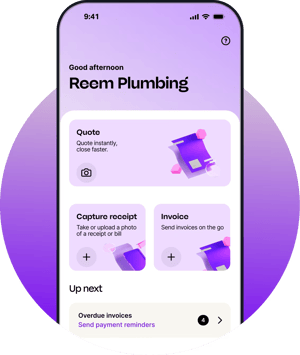
MYOB Assist is our new home for mobile receipt capture, quoting and invoicing. It replaces MYOB Capture and MYOB Invoice, bringing key mobile workflows together in one supported app.
Capture receipts on the go
Create and manage quotes
Create and send invoices
Sign in securely using biometrics or a passcode
Learn more about the retirement of the Capture and Invoice apps
Learn more about the retirement of MYOB Capture app.
Learn more about the retirement of MYOB Invoice app.
Why are MYOB Capture and MYOB Invoice retiring?
MYOB Capture and MYOB Invoice apps are no longer supported. MYOB Assist is our new go-forward mobile app, replacing Capture and Invoice. Assist brings receipt capture, quoting and invoicing together in one supported app.
When will MYOB Capture and MYOB Invoice stop working?
Both apps will be retired on 29 September 2026. After this date, they'll no longer work, be supported, or receive updates.
Why can I still use both MYOB Capture and MYOB Invoice apps right now?
We're keeping the MYOB Capture and MYOB Invoice apps available for a short time to help make the transition to MYOB Assist smoother. We recommend switching to MYOB Assist as soon as possible to avoid disruption and to take advantage of new features and updates.
What do I need to do?
Download MYOB Assist from the App Store or Google Play and sign in with your existing MYOB details. Once you're set up, you can safely remove MYOB Invoice and MYOB Capture from your device.
What happens if I don't switch before 29 September 2026?
Will I lose any data?
No, invoices, quotes and captured receipts are stored securely in your MYOB file, not on the app itself.
Does MYOB Assist cost extra?
No, it's included in your existing MYOB subscription.
What MYOB plans work with MYOB Assist?
MYOB Assist supports Australian subscriptions including: MYOB Business (Lite & Pro), AccountRight (Plus, Premier, Basics & Standard) and Connected Ledger (though invoicing isn't available on this plan).
MYOB Assist is not compatible with Payroll-only plans and AccountRight Offline files and requires internet connection.
Does MYOB Assist support multiple businesses or files?
Yes, you can switch between any businesses or files you've got access to in the app, as long as they're compatible with MYOB Assist. If one isn't, you'll get a message in the app letting you know.
What devices are compatible with MYOB Assist?
MYOB Assist works on iPhone, Android and tablets. Although, it’s designed for a mobile-first experience.
What can MYOB Assist do that the old apps couldn't?
MYOB Assist is our new go-forward mobile app, replacing Capture and Invoice. Assist brings receipt capture, quoting and invoicing together in one supported app. Assist offers fast login with biometrics or a passcode, backed by built-in security. Find what you need fast and see what’s in progress at a glance.
You’ll enjoy new mobile features like duplicate invoices and quotes instead of starting from scratch, add attachments and send them straight from your phone. Receipts are auto-cropped and OCR-optimized, making uploading expenses simple. The new Field role lets you give staff the ability to quote, invoice and capture on-the-go, with app-only access, keeping your sensitive data protected.
Is anything different in MYOB Assist compared to the old apps?
MYOB Assist offers a broader range of features compared to MYOB Capture and MYOB Invoice apps, so some tasks might take an extra tap or two. The Professional layout for quotes and invoices isn't supported, you can still view and share these, just not edit them. The salesperson name field (compatible with AccountRight files) isn't available in MYOB Assist yet. Shared or indefinite logins aren't available, as part of stronger account security.
I used to share my login for MYOB Capture so staff could upload receipts. What role do I give them for receipt-only access in MYOB Assist?
To give staff receipt-capture only access in MYOB Assist, with the least access granted in MYOB Business or AccountRight:
For MYOB Business files: Grant the Contacts role.
For AccountRight files: Grant the Cards role. Go to Setup > User Access > Manage Roles > Cards > then only select ‘Customer Cards’ with Read & Write access.
Is there anything MYOB Assist doesn't do yet?
A few things; seeing whether a quote or invoice that’s been emailed or viewed (head to the browser or desktop for that), the Activity Slip for AccountRight, supplier records (customer records are supported), and automatic receipt matching to spend money transactions. We're continuing to build MYOB Assist based on customer feedback.
Can I share my login for MYOB Assist with my colleagues?
No, every user needs their own sign-in, sharing logins is a real security risk for your business. If your team's been sharing one login for MYOB Capture, now's the time to set everyone up with their own.
Is multipage capture available in MYOB Assist?
Yes, you can capture and upload a receipt with up to 20 pages for a single expense line, all in one go.
Where do receipts captured in the app go?
In MYOB Business, you’ll find captured receipts in Uploads. In AccountRight, they are located in the In Tray in AccountRight.