
MYOB Assist app
The admin’s done the moment you leave the job. Quote it, invoice it, snap the receipt — when it happens.


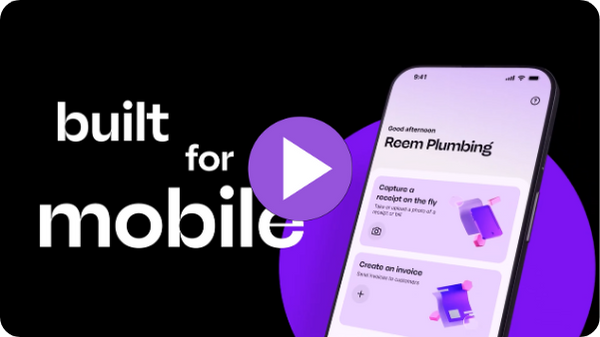
Made for on-the-go invoicing, quoting and expense capture
No matter where your business takes you, let the new MYOB Assist app do the heavy lifting. Less time on admin. More time for the work you’re proud of — and a clearer head when the day is done.

Access is included with eligible subscriptions
Free for you and your team to use as part of your MYOB subscription.

Keep everyday admin moving from your phone
Capture receipts, invoice and quote as the work happens.

Your cashflow is always up-to-date
Invoices and receipts flows straight into MYOB, so the numbers are never behind.
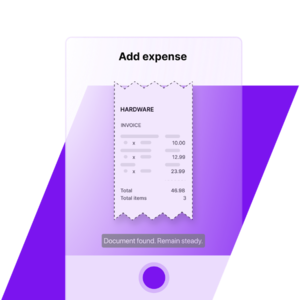
Snap every expense, miss nothing
Quickly snap a pic of a receipt, or use an existing photo of one, crop it and add a note if you wish.
To action the captured receipt, you can then jump into MYOB in a web browser to see your upload. You can choose to attach to an existing expense transaction, or use the smarts in MYOB to scan the pic to automatically fill in the details in a new transaction.
Got a team on the road? They can use MYOB Assist to capture and upload receipts — while you stay in full control of what they can see.
Invoice while the gratitude's hot
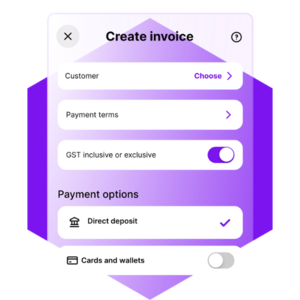
- Create, edit, and send professional invoices in just a few taps.
- Add your products or services, share a custom message, and deliver invoices instantly.
- Stay in control of your cash flow by tracking who’s paid at a glance and sending quick payment reminders right from your phone.
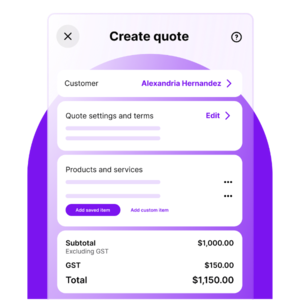
Quote instantly, close faster
Create, manage and send quotes on the go. Instantly send them via email. Easily turn accepted quotes into invoices — so you can spend more time doing the job, not chasing one.Quotes is available to those with the following roles: Owners, Administrators, Sales and Field role.
Give your team safe, app-only access
Give staff app-only access to quote, invoice and capture receipts on the go, while sensitive business data stays protected. Employees assigned the Field role only can use the MYOB Assist app. Browser and desktop access stay with the people who manage the books, including online payment settings.
Get help setting up field access for MYOB Business or AccountRight desktop.
/Product_images/UI_MYOBassist-add-member.png?width=400&height=222&name=UI_MYOBassist-add-member.png "UI_MYOBassist-add-member")
See how we’ve helped our customers

“I can scan a receipt the moment I get it - straight into MYOB. It’s quick, accurate and keeps me organised.”
Brett Engeman
Founder, Aspirational Leaders Co.
Australia

"MYOB Assist is very easy to navigate. It saves us time in the office as it streamlines the software that we use.”
Riley Collins
Montville Mist Springwater
Australia
MYOB Capture and Invoice apps are retiring 23 November 2026
After you’ve downloaded MYOB Assist, you can remove the Capture and Invoice apps from your device. Your data won't be lost when the Capture and Invoice apps retire. It remains stored securely online in your MYOB file.
For more information about this change, including FAQs, visit our information hub. For setup and support, head to our MYOB Assist help content.

Learn more about the retirement of MYOB Capture app.
Learn more about the retirement of MYOB Invoice app.
What is MYOB Assist?
MYOB Assist is our new mobile app for receipt capture, quoting and invoicing for businesses on-the-go.
Who is MYOB Assist for?
Small business working on-site, on the road or anywhere other than a desk.
When can I get MYOB Assist in New Zealand?
How do I download MYOB Assist?
iPhone: Apple app store
Android: Google Play store
How do I get setup or find help with MYOB Assist?
Download MYOB Assist, sign in with your MYOB account details and complete any multi-factor authentication steps.
Need a hand in the app? Tap the '?' in the top right.
You can also check the MYOB Assist Getting Started guide or contact MYOB Support for troubleshooting and best practice guides.
Do I need a MYOB subscription to use the app?
Yes, MYOB Assist works alongside your MYOB Business, AccountRight or Connected Ledger file. It’s not a standalone app.
Does it cost extra
No, access to the app is included in your existing MYOB subscription.
What MYOB plans work with MYOB Assist?
MYOB Assist works with:
-
MYOB Business (Lite & Pro)
-
AccountRight (Plus, Premier, Standard and Basics. Expense capture is not available with AccountRight Basics plans used in desktop.)
-
Connected Ledger (though invoicing isn't available on this plan).
MYOB Assist is not compatible with Payroll-only plans or AccountRight Offline files, and you’ll need an internet connection.
What devices are compatible?
iPhone, Android and tablets, although it’s designed for a mobile-first experience. Check your app store for the minimum OS version required.
Can I send invoices and quotes straight from my phone?
Yes - create and send both invoices and quotes from the app. Duplicate one instead of starting from scratch, or turn an accepted quote into an invoice with a single tap.
How does receipt capture work?
Snap a photo (or add one from your gallery), add a note while it's fresh in your mind, and it automatically flows into MYOB.
Is multipage capture available in MYOB Assist?
Yes, you can capture and upload up to 20 pages for a single expense line, all in one go.
Where do receipts captured in the app go?
In MYOB Business, you’ll find them in Uploads. In AccountRight, they are located in the In Tray.
Can I customise invoice templates in MYOB Assist?
No, invoice templates cannot be customised within the app, you’ll need to head to the browser or desktop for that. The app uses the default template saved in your file.
Can I process payroll or create pay runs in MYOB Assist?
No, Payroll isn’t available in the app yet - you’ll need to use the browser or desktop for that.
Does MYOB Assist support multiple businesses or files?
Yes, switch between any businesses or files you've got access to in the app. If one isn't compatible, the app will let you know.
Is MYOB Assist secure?
Yes - sign in fast with your face, fingerprint or a six-digit passcode, backed by built-in security.
Is multi-factor authentication (MFA) required?
Yes, MYOB Assist uses the same login and MFA steps as your MYOB Business and AccountRight file, so your security stays strong and consistent.
What's the Field role, how do I set it up for my team?
The Field role gives employees app-only access to quoting, invoicing and receipt capture, so they can get the job done without access to MYOB Business or AccountRight. Assign it in MYOB Business or AccountRight in User Access. Learn more about Field Role here.
Can I share my login with my staff?
No, every user needs their own sign-in, sharing logins is a real security risk for your business. If your team has been sharing one login for MYOB Capture, now's the time to set everyone up with their own.
I used to share my login for MYOB Capture so staff could upload receipts. What role do I give them for receipt-only access in MYOB Assist?
Each team member needs to be set up with their own sign-in. To give employees receipt-capture only access in MYOB Assist, with the least access granted in MYOB Business or AccountRight:
For MYOB Business files: Grant the Contacts role.
For AccountRight files: Grant the Cards role. Go to Setup > User Access > Manage Roles > Cards > then only select ‘Customer Cards’ with Read & Write access.
Why can’t I send an invoice PDF via SMS/iMessage from my iPhone?
Some iPhones on iOS 15+ have a known Apple issue that can block PDF attachments in Messages - it’s a known issue that isn’t isolated to MYOB Assist. If you experience this issue, we recommend emailing the invoice from MYOB Assist instead or sending a secure link.
Can I submit feedback or request features for MYOB Assist?
Yes, in the Community Forum section of the Settings menu in the app you can share feedback, report issues or suggest new features.