
AccountRight login is changing
Your sign-in experience will look different. Single sign-on is coming from 21 May 2026
Sign in once. Stay connected everywhere
Move faster between desktop and browser without repeat logins. We’re re-releasing single sign‑on (SSO) in the next AccountRight feature release, so you can get back to the work that matters.
Here's how it works
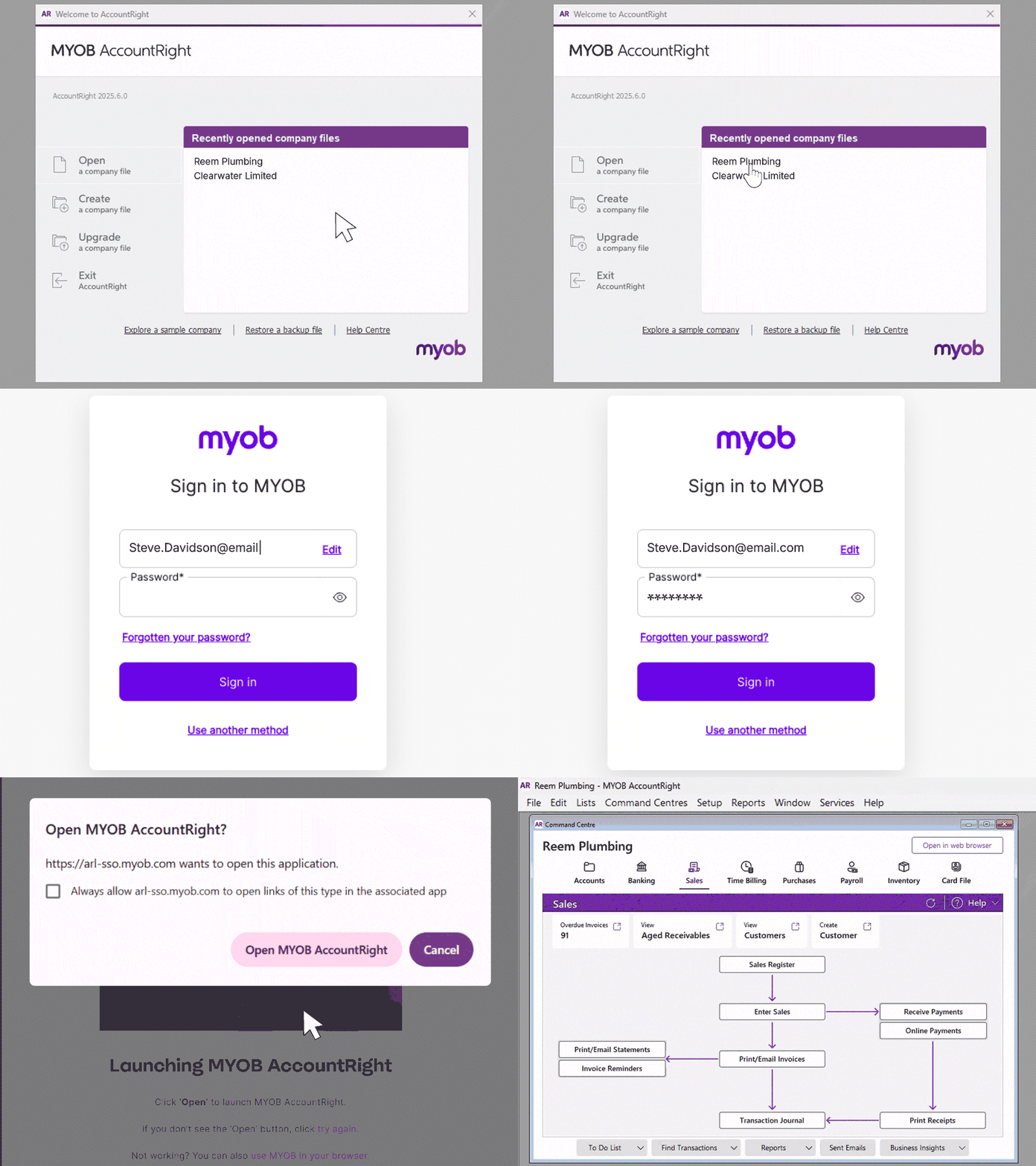
Sign in once and stay connected across desktop and browser. When you sign in to the desktop app, you'll be automatically signed in to the browser too — and a browser window will open at the same time. Meaning you can move faster between both.

Sign in screens that remember you
Your email now pre‑fills on login screens, so you’re back to work faster with fewer clicks.

Added security
Going forward, simultaneous logins across multiple files are only supported when using the same user ID. To access a file with a different user ID, you must first log out and then log back in with the new credentials.

Password manager friendly
Use your preferred password manager in your default browser. Save and autofill your credentials safely for quicker access every time.

Works the way you work
AccountRight uses your computer’s default browser. But if you switch to a different browser later, you’ll simply need to sign in again there to stay connected.

Enhanced account protection
If you're inactive, then after about 30 minutes you'll be signed you out. It’s there to meet ATO security requirements.
How to use single sign-on
- Sign in to AccountRight on desktop.
- Your default browser will open and you’ll be signed in there as well.
- Keep using your preferred password manager in your default browser.
- Switching browsers? You’ll need to sign in again in the new browser.
- While we have single sign-in, single sign‑out isn’t available yet. Make sure to sign out from AccountRight, then sign out in your browser.
- You can sign out from AccountRight desktop by selecting Services > Sign out from AccountRight Live.
FAQ
When is this rolling out?
Single sign-on is planned for release on 21 May 2026.
Will I get signed out if I’m inactive?
Yes. About 30 minutes of browser inactivity will sign you out.
Why is the inactivity timer set to 30 minutes?
It meets ATO security requirements and can’t be extended.
Does this work if my file is offline?
No, your company file needs to be online. Offline files will no longer be available in AccountRight from June 2026. See this page for more information.
What if I previously logged in to different files simultaneously using different emails?
You'll need to add the same email / user ID to each file you want to have open at the same time.
Which browser opens for single sign-on?
AccountRight uses your computer’s default browser.
Can I keep using my password manager?
Yes. Use the password managers supported by your default browser.
Is single sign-out available?
Not currently. Single sign-out is not available at this time, but it is being explored for future improvement.